 UAE Dirham
 USD
USD

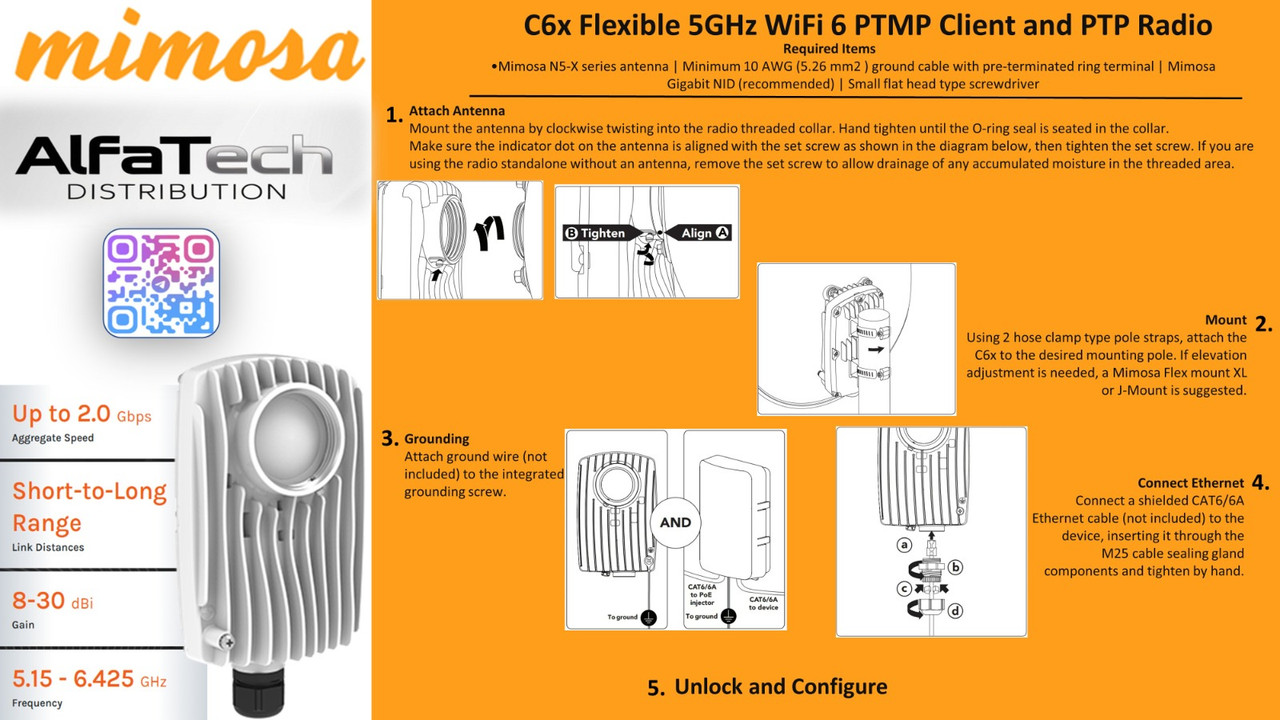
General Configuration Steps for Mimosa C6x:
Physical Installation:
Mount the C6x and the chosen antenna securely.
Ensure proper grounding.
Connect the Ethernet cable and power (PoE).
Accessing the Device:
Connect a computer to the C6x via Ethernet.
Access the device's web interface using its default IP address (refer to the device's documentation).
Basic Settings:
Set a strong administrator password.
Configure the device's IP address and network settings.
Update the firmware to the latest version.
Wireless Configuration:
PTMP Client:
Scan for the access point (AP) SSID.
Enter the AP's security credentials.
Configure the operating frequency and channel bandwidth.
PTP Backhaul:
Set the operating frequency and channel bandwidth.
Configure the security settings.
Align the antennas for optimal signal strength.
Advanced Settings:
Configure QoS (Quality of Service) settings.
Adjust transmit power and other RF parameters.
Monitor network performance and make adjustments as needed.
Mimosa Design Tool:
It is highly recommended to use the Mimosa Design Tool. This tool will help with link planning, and give you an idea of expected performance.
Stay updated with our latest products, exclusive deals, and industry insights! Join our community on:
Telegram: https://t.me/alfatech
Facebook: https://www.facebook.com/alfatech.me
Instagram: https://www.instagram.com/alfatech.me/
WhatsApp: https://whatsapp.com/channel/0029VaHH5wbDJ6Gv1MvEG60C
Follow us now and be part of the AlfaTech network!