 UAE Dirham
 USD
USD

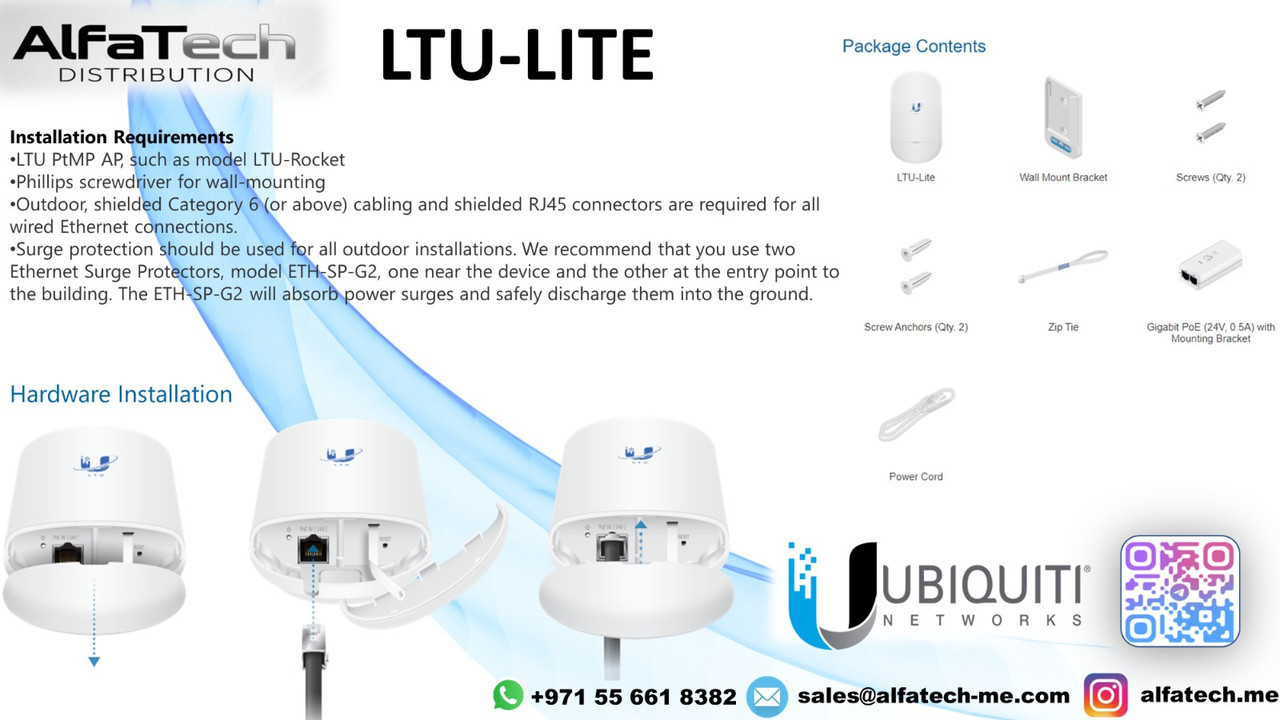
Installation Requirements
✅ LTU PtMP AP (e.g., LTU-Rocket)
✅ Phillips screwdriver for wall mounting
✅ Outdoor shielded Cat6+ cable & shielded RJ45 connectors
✅ Surge protection (Use ETH-SP-G2 near the device & building entry point)
Package Contents
LTU-Lite Unit
Wall Mount Bracket & Screws
Gigabit PoE (24V, 0.5A) with Mounting Bracket
Screw Anchors & Zip Tie
Power Cord
Hardware Installation Steps
1️⃣ Open the LTU-Lite by removing the bottom cover.
2️⃣ Connect the shielded Ethernet cable to the RJ45 PoE IN port.
3️⃣ Secure the device on a pole or wall using the mounting bracket.
4️⃣ Use surge protectors at the device & building entry.
5️⃣ Power the unit using the included Gigabit PoE injector.
Once installed, configure the LTU-Lite via UISP or Web UI. Enjoy long-range, high-speed wireless connectivity! ?
Stay updated with our latest products, exclusive deals, and industry insights! Join our community on:
Telegram: https://t.me/alfatech
Facebook: https://www.facebook.com/alfatech.me
Instagram: https://www.instagram.com/alfatech.me/
WhatsApp: https://whatsapp.com/channel/0029VaHH5wbDJ6Gv1MvEG60C
Follow us now and be part of the AlfaTech network!