 UAE Dirham
 USD
USD


A regional ISP needed a high-capacity wireless backhaul solution to extend its coverage to a remote town located 25 km away. Their existing 5 GHz PTP link suffered from interference, weather disruptions, and inconsistent throughput, leading to frequent service complaints. They required a long-range, high-speed, and interference-resistant solution to maintain reliable connectivity for their expanding user base.
ALFA TECH’s Solution
ALFA TECH recommended and deployed the Ubiquiti airFiber 60 XR (AF60-XR) to establish a robust wireless backhaul. The 60 GHz spectrum ensured a low-interference environment, while its integrated GPS and beamforming technology provided stable performance over long distances.
Installation & Configuration:
Precise Alignment: Installed the AF60-XR units on 30-meter towers to maintain a clear line-of-sight (LoS).
Link Configuration: Configured the channel width at 2160 MHz to maximize throughput.
Redundancy Setup: Enabled 5 GHz backup failover for uninterrupted connectivity during adverse weather.
Performance Tuning: Optimized signal strength using Ubiquiti’s UISP software, ensuring 1.9 Gbps aggregate throughput.
Customer Satisfaction
After deploying the AF60-XR, the ISP saw a 400% increase in backhaul capacity, significantly improving service quality and reducing latency. Customers in the remote town now enjoy fiber-like speeds, and the ISP successfully expanded its user base without the high costs of fiber deployment. The AF60-XR proved to be a cost-effective, scalable, and high-performance solution for extending network coverage.
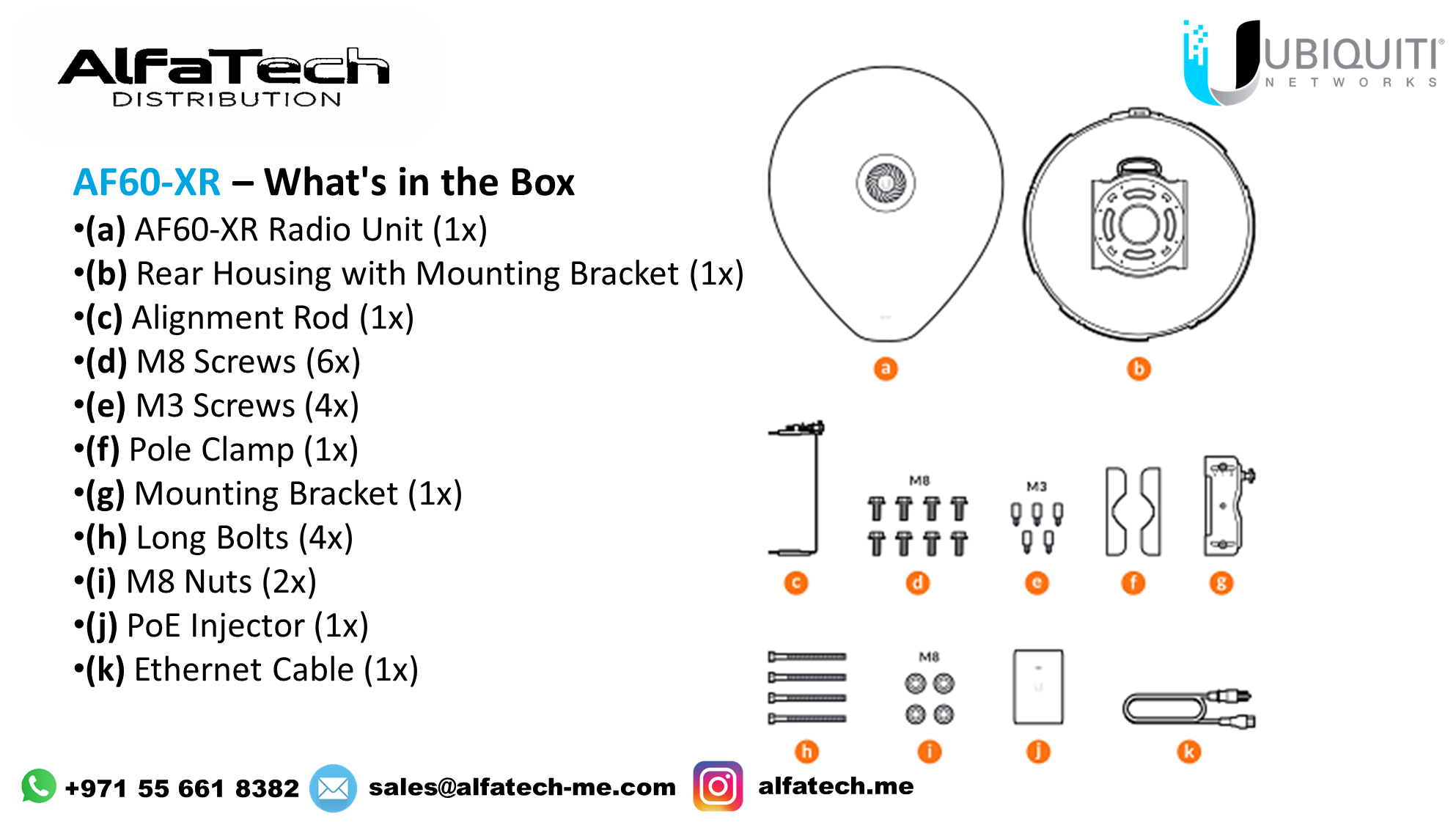
AF60-XR – This refers to the Ubiquiti airFiber 60 XR, a high-performance 60 GHz PtP (Point-to-Point) radio.
Labeled Components (Installation Kit):
Each component is labeled with letters:
(a) AF60-XR main unit (front view)
(b) AF60-XR main unit (back view)
(c) L-shaped mounting bracket
(d) M8 screws (for mounting)
(e) M3 screws (smaller screws for assembly)
(f) Antenna support bracket
(g) Pole mount bracket
(h) Long bolts for pole mounting
(i) Additional M8 bolts
(j) PoE (Power over Ethernet) adapter
(k) Ethernet cable
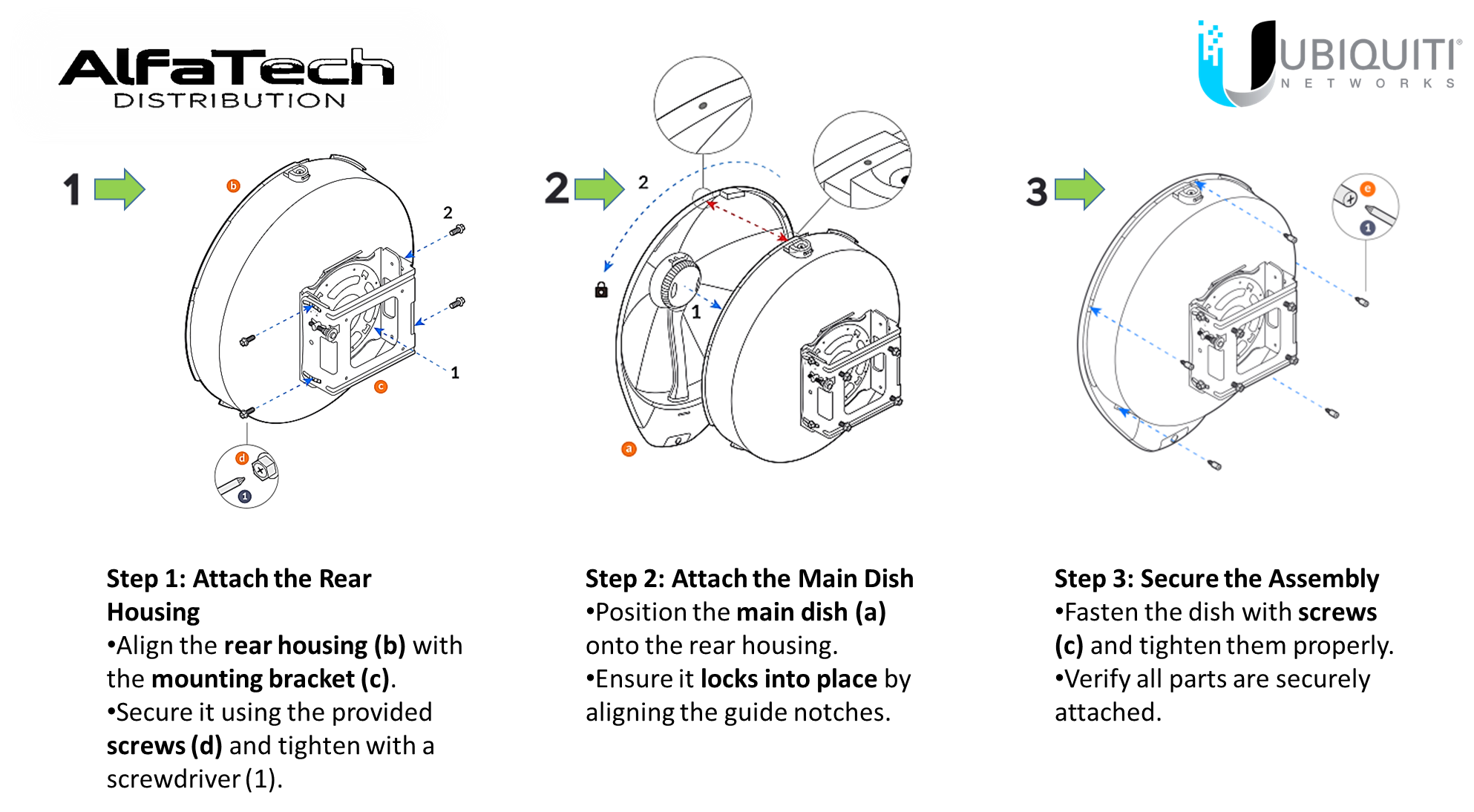
Overview of the Installation Steps:
Step 1:
Attach the mounting bracket (c) to the back of the AF60-XR unit.
Secure it using screws (1, 2).
The small inset image shows a detailed view of the locking mechanism (d).
Step 2:
Align and attach the front dish reflector (a) to the main body.
Ensure the clips lock into place, as shown in the close-up illustrations.
The locking symbol indicates a secure connection.
Step 3:
Secure the dish to the back unit using multiple screws (blue arrows).
The inset shows a closer view of the final locking screw (e, 1).
This guide is particularly useful for installers and network engineers setting up the AF60-XR for long-range, high-speed wireless backhaul.
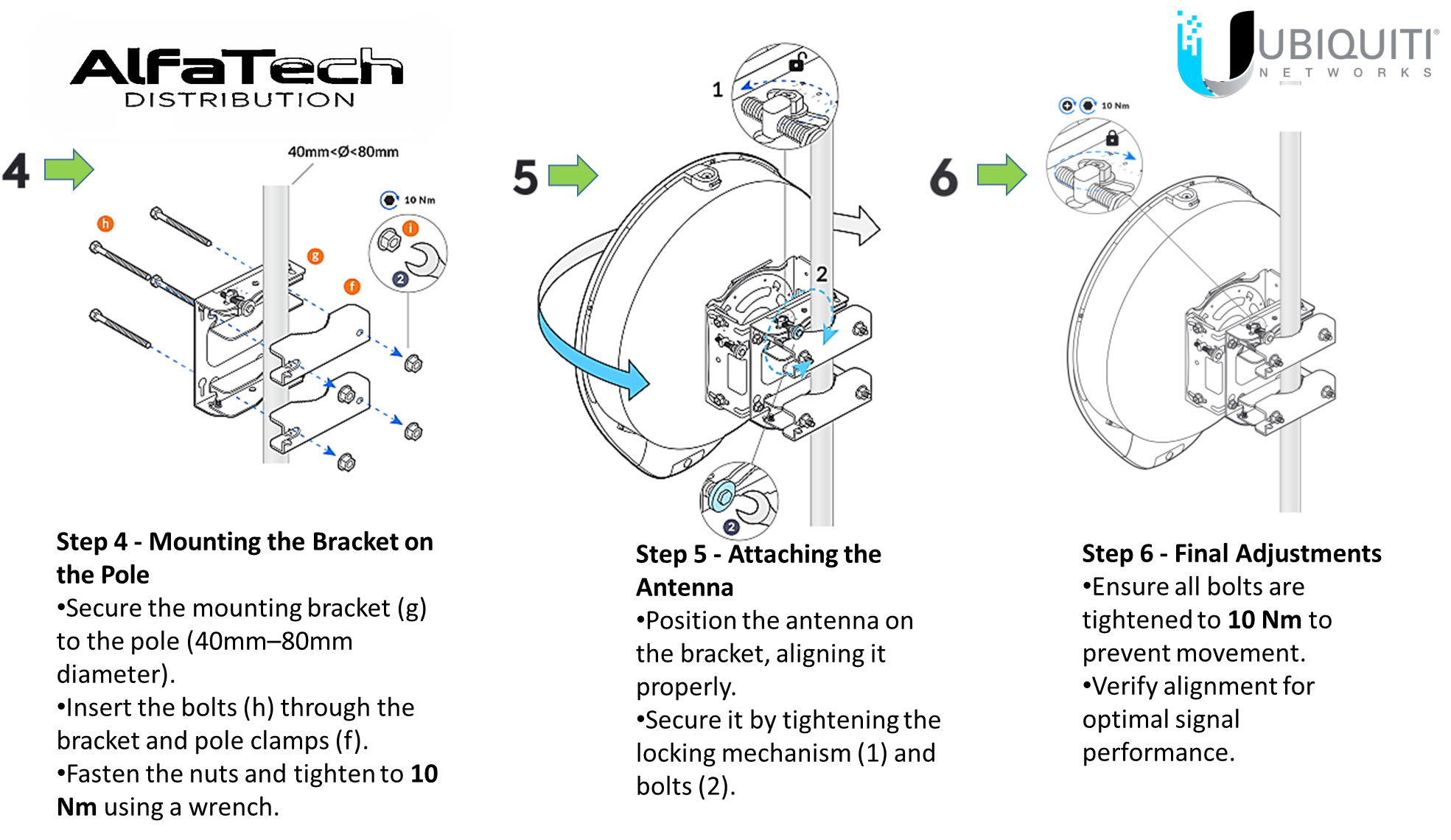
Step 4:
Mount the bracket assembly to a pole (40mm–80mm in diameter).
Secure it using bolts (h), washers (f, g), and nuts.
The inset shows a tightening torque of 10 Nm for proper security.
Step 5:
Attach the AF60-XR unit to the mounted bracket.
Lock the device in place using screws (2).
The close-up image shows the correct insertion method.
Step 6:
Tighten the bracket assembly to secure the AF60-XR.
The inset reminds to apply a 10 Nm torque for stability.
This guide is useful for installers deploying long-range wireless links with the AF60-XR.
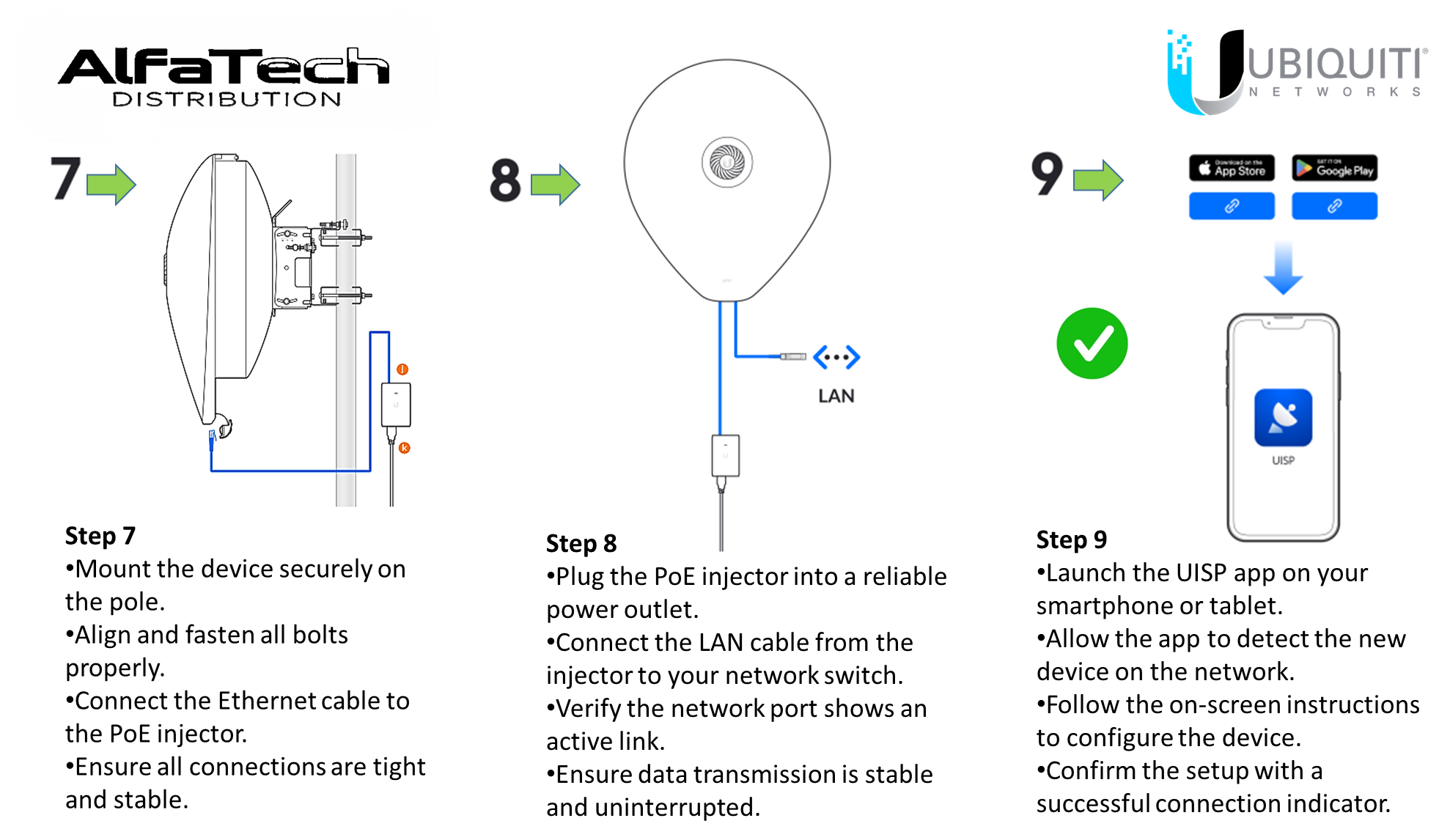
[2:28 pm, 11/03/2025] Milad - Deyar: Overview of the Final Installation Steps:
Step 7:
Connect the Ethernet cable from the AF60-XR to the PoE injector for power and data transmission.
Ensure the PoE adapter is plugged into a power source.
Step 8:
The LAN cable from the PoE injector should be connected to the network or a management device.
Step 9:
Download and install the UISP App from the App Store or Google Play.
Use the app to configure and manage the AF60-XR.
Stay updated with our latest products, exclusive deals, and industry insights! Join our community on:
Telegram: https://t.me/alfatech
Facebook: https://www.facebook.com/alfatech.me
Instagram: https://www.instagram.com/alfatech.me/
WhatsApp: https://whatsapp.com/channel/0029VaHH5wbDJ6Gv1MvEG60C
Follow us now and be part of the AlfaTech network!