 UAE Dirham
 USD
USD

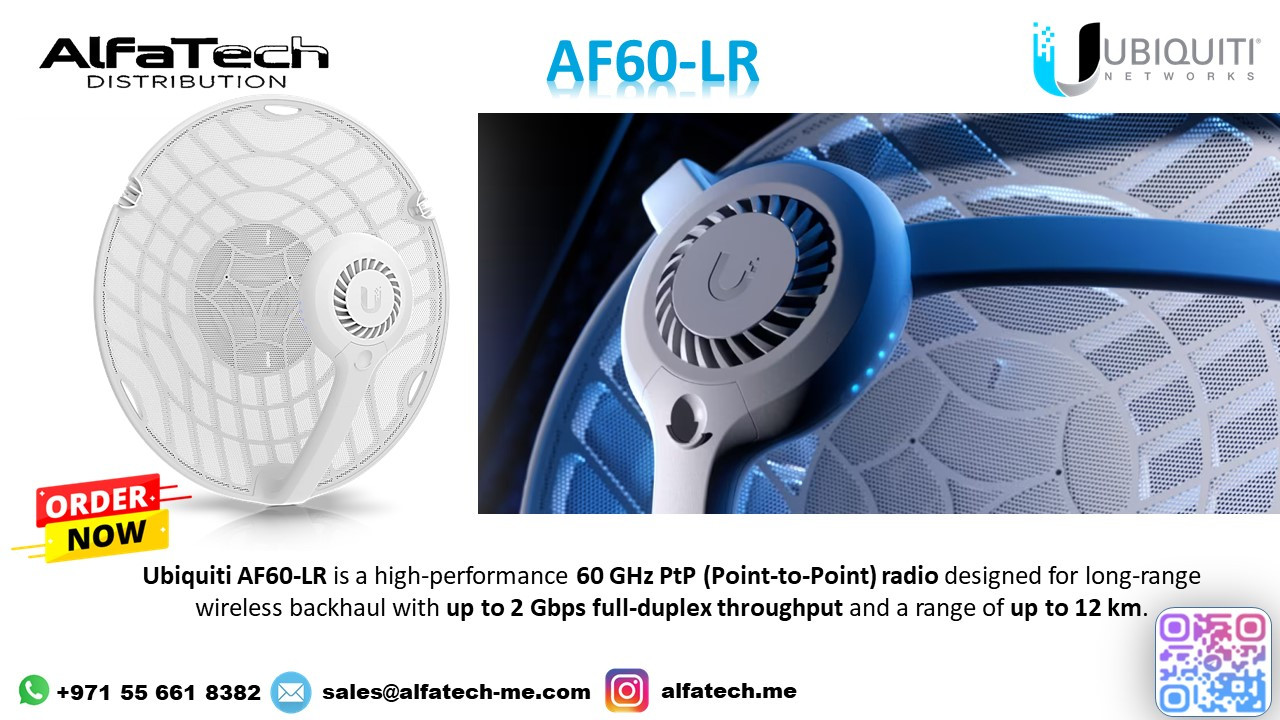
Customer Pain Point
A regional ISP was struggling to deliver high-speed internet to a remote industrial site located 10 km away. Fiber installation was not feasible due to high costs and logistical challenges. Traditional wireless solutions suffered from interference and limited range, making it difficult to provide reliable backhaul connectivity.
ALFA TECH’s Solution
To overcome these challenges, ALFA TECH deployed Ubiquiti AF60-LR for a high-capacity 60 GHz backhaul link. The AF60-LR was chosen for its:
Long-range (up to 12 km) capability.
60 GHz interference-free spectrum for a stable and high-speed connection.
Integrated GPS sync and precision alignment, ensuring a reliable point-to-point link.
By leveraging Wave Technology, the AF60-LR delivered over 1 Gbps throughput, connecting the industrial site with ultra-low latency. The setup was completed using Ubiquiti UISP for remote monitoring and management.
Customer Satisfaction
The ISP successfully expanded its network without costly fiber deployment. The industrial site now enjoys seamless, high-speed internet, supporting real-time data transfer, VoIP, and cloud applications. The AF60-LR’s stable performance and easy management exceeded expectations, leading to plans for additional deployments in similar locations.
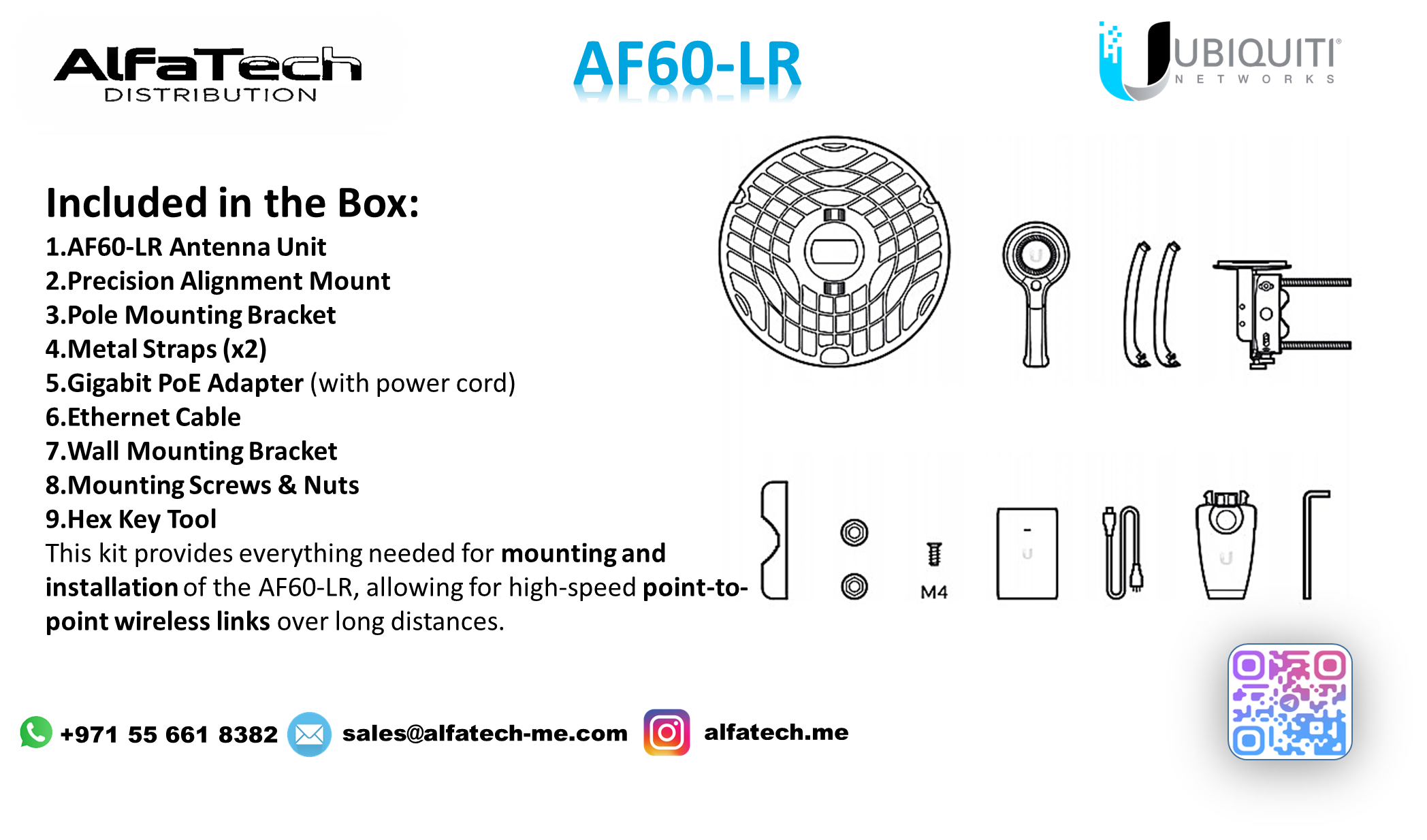
Installation & Configuration Details
Mounting & Alignment
Installed AF60-LR units on 10m poles for better line-of-sight.
Used built-in aiming tools & LED indicators for precise alignment.
Link Configuration
Configured auto-channel selection to avoid interference.
Enabled TDMA GPS sync for optimized performance.
Performance Optimization
Activated Adaptive Modulation to maintain stability.
Monitored the link using UISP dashboard for real-time stats.
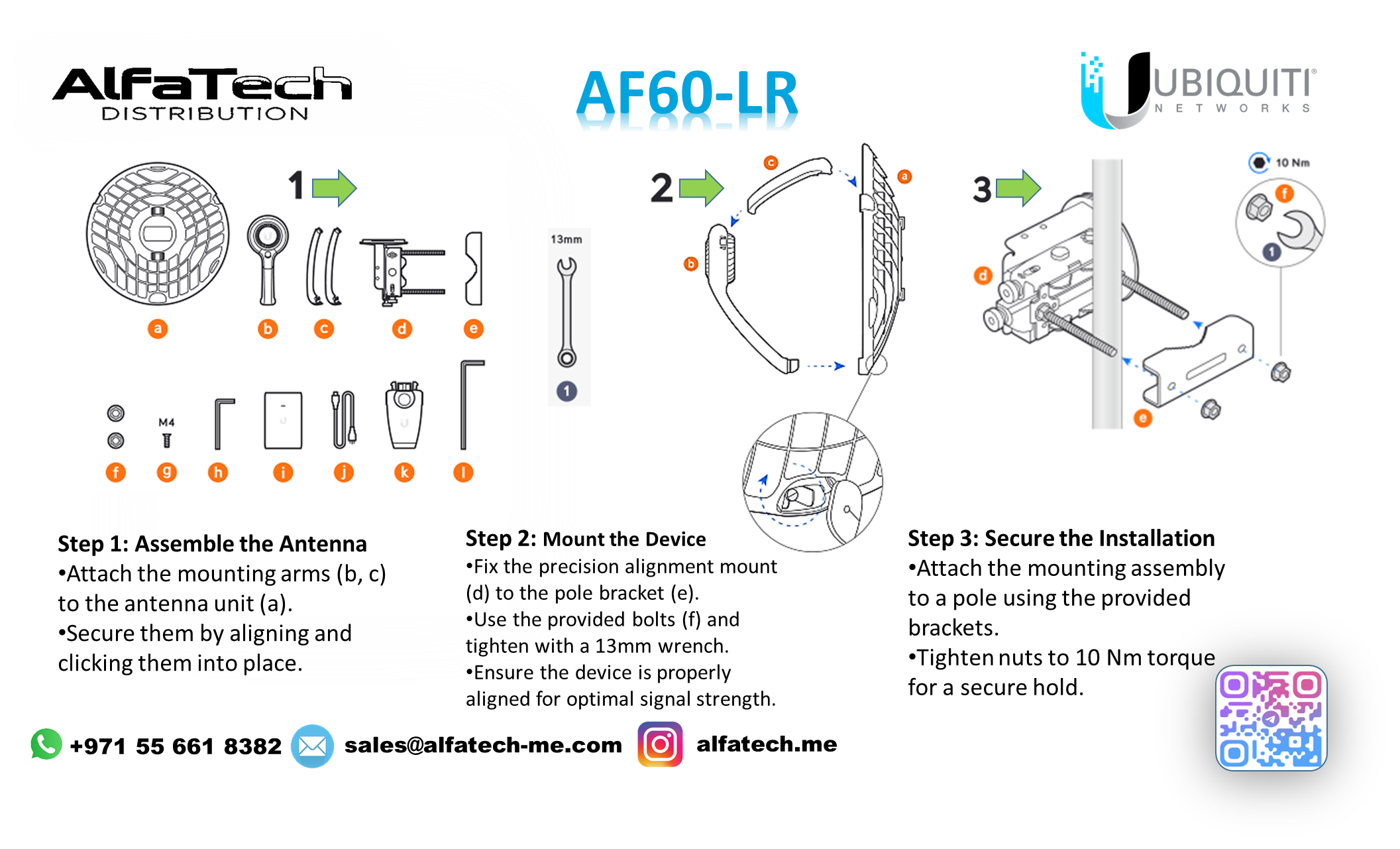
Installation Steps
Step 1: Assemble the Antenna
Attach the mounting arms (b, c) to the antenna unit (a).
Secure them by aligning and clicking them into place.
Step 2: Mount the Device
Fix the precision alignment mount (d) to the pole bracket (e).
Use the provided bolts (f) and tighten with a 13mm wrench.
Ensure the device is properly aligned for optimal signal strength.
Step 3: Secure the Installation
Attach the mounting assembly to a pole using the provided brackets.
Tighten nuts to 10 Nm torque for a secure hold.
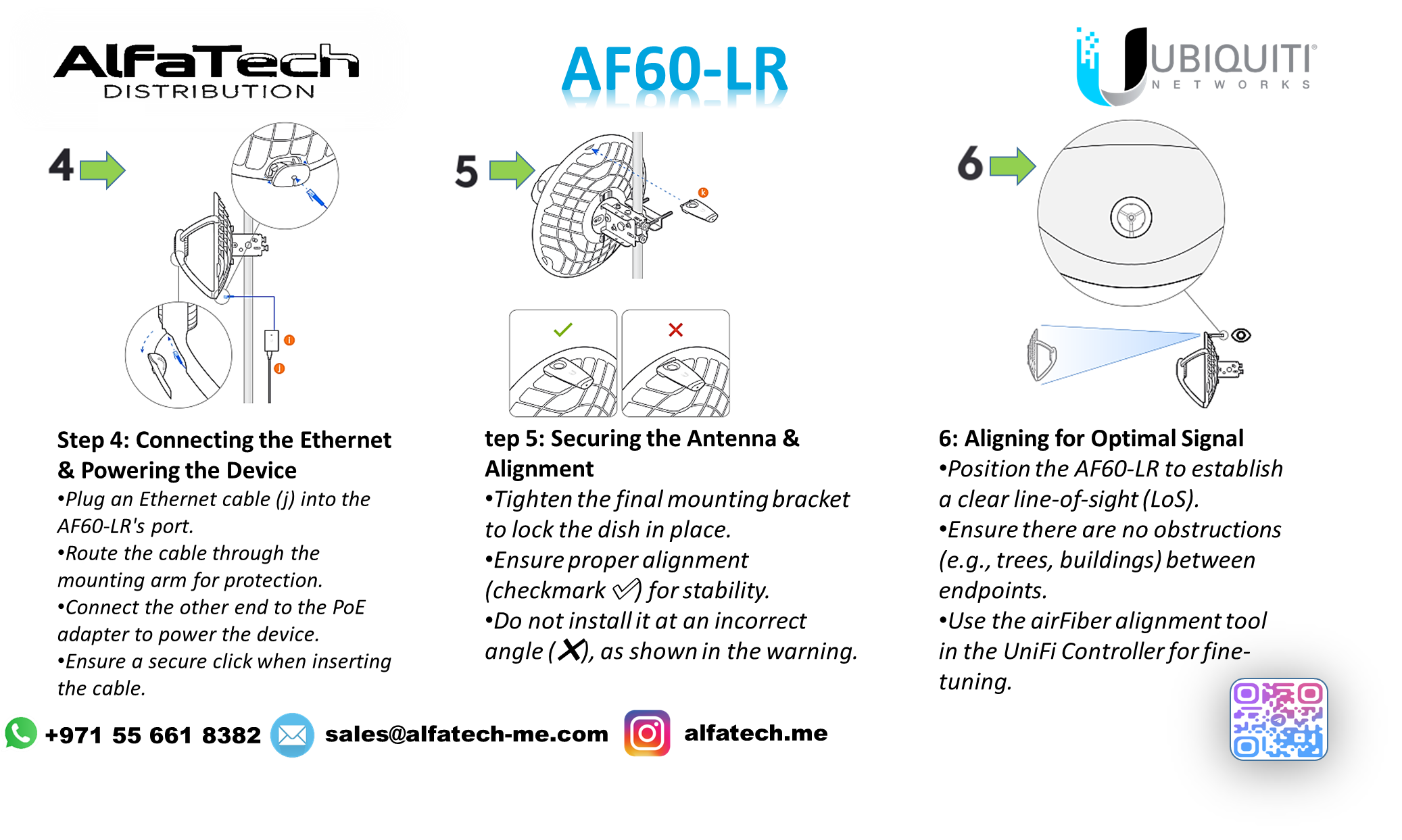
Step 4: Connecting the Ethernet & Powering the Device
Plug an Ethernet cable (j) into the AF60-LR's port.
Route the cable through the mounting arm for protection.
Connect the other end to the PoE adapter to power the device.
Ensure a secure click when inserting the cable.
Step 5: Securing the Antenna & Alignment
Tighten the final mounting bracket to lock the dish in place.
Ensure proper alignment (checkmark ✅) for stability.
Do not install it at an incorrect angle (❌), as shown in the warning.
Step 6: Aligning for Optimal Signal
Position the AF60-LR to establish a clear line-of-sight (LoS).
Ensure there are no obstructions (e.g., trees, buildings) between endpoints.
Use the airFiber alignment tool in the UniFi Controller for fine-tuning.
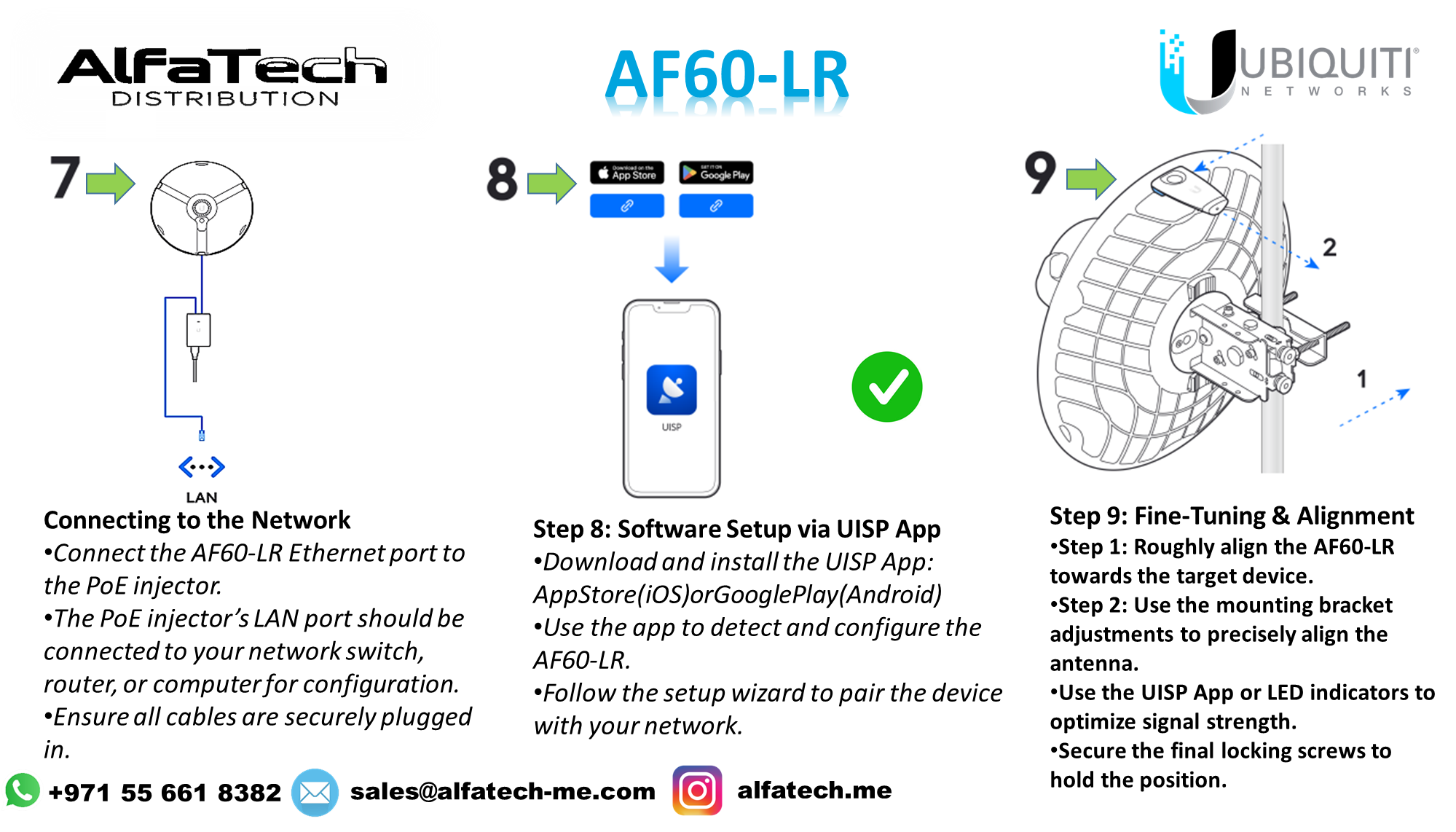
Step 7: Connecting to the Network
Connect the AF60-LR Ethernet port to the PoE injector.
The PoE injector’s LAN port should be connected to your network switch, router, or computer for configuration.
Ensure all cables are securely plugged in.
Step 8: Software Setup via UISP App
Download and install the UISP App:
App Store (iOS) or Google Play (Android).
Use the app to detect and configure the AF60-LR.
Follow the setup wizard to pair the device with your network.
Step 9: Fine-Tuning & Alignment
Step 1: Roughly align the AF60-LR towards the target device.
Step 2: Use the mounting bracket adjustments to precisely align the antenna.
Use the UISP App or LED indicators to optimize signal strength.
Secure the final locking screws to hold the position.
✅ Final Checks
Ensure the connection is stable and the signal quality is optimal.
Complete the configuration in UISP or airFiber UI.
The AF60-LR is now ready for high-speed point-to-point communication.
Stay updated with our latest products, exclusive deals, and industry insights! Join our community on:
Telegram: https://t.me/alfatech
Facebook: https://www.facebook.com/alfatech.me
Instagram: https://www.instagram.com/alfatech.me/
WhatsApp: https://whatsapp.com/channel/0029VaHH5wbDJ6Gv1MvEG60C
Follow us now and be part of the AlfaTech network!